Analytics
What Google Search Console shows - and what it does not
Three sites in Search Console: the average position is roughly the same for all of them, while the share of clicks differs several times over. Screenshots of the reports, and what these numbers do and do not prove.
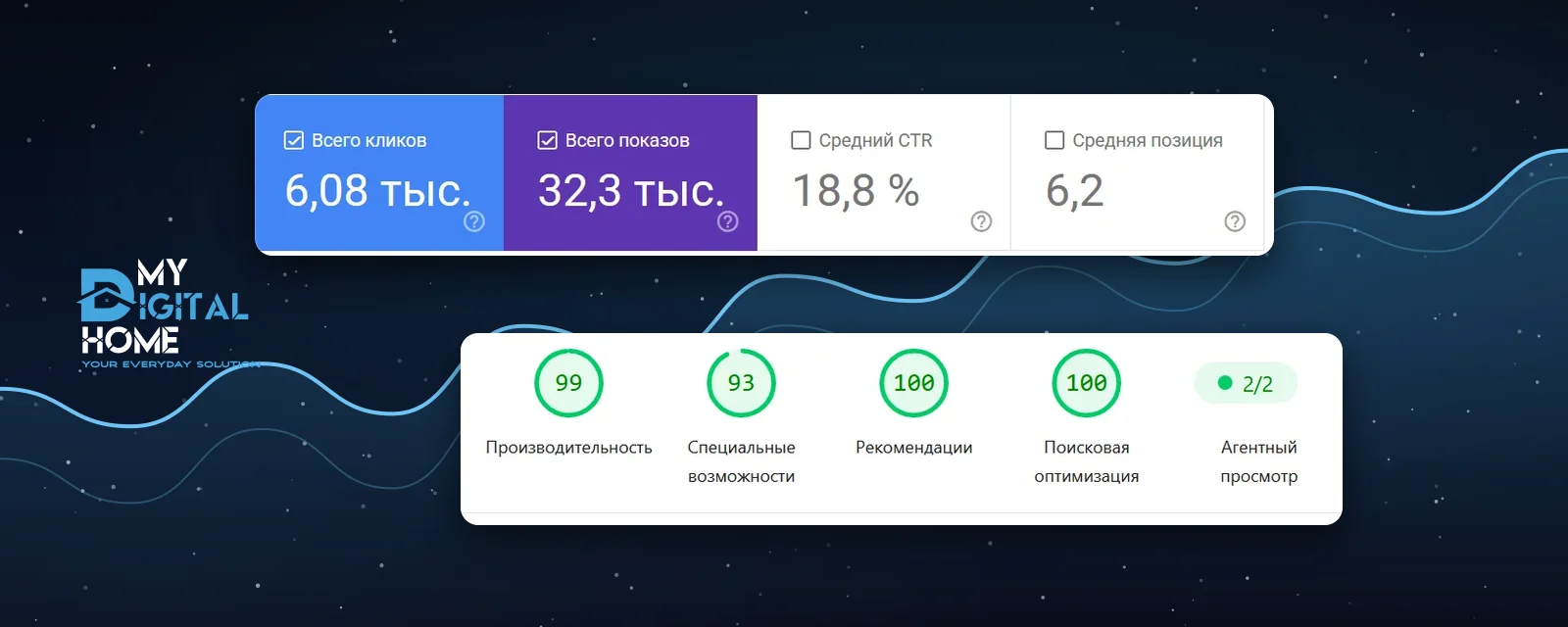
SEO blogs usually say "we tripled the traffic" and never show where the number came from. We have access to the Google Search Console accounts of three websites we built and maintain, and below we simply show their reports. Every number covers the same three months, from 5 June to 3 September 2026. At the end we look separately at the speed of a fourth, much newer site.
01What Search Console counts and what it does not
The tool reports four metrics plus the state of indexing:
- Clicks - how many times someone went to the site from search results.
- Impressions - how many times a link to the site appeared on a results screen.
- CTR - the share of impressions that turned into a click.
- Average position - which row of the results page the site held on average.
- Indexing - which pages the crawler visited, which ones made it into the index, and which were dropped.
What Search Console does not have: leads, calls, emails, sales or revenue. The tool ends at the click; everything after that is the website and the sales team. That is why the honest metric for a website case study is search visibility and technical health, and why the phrase "we brought in N leads" can never be derived from Search Console, no matter how long you stare at the graphs.
The second limit is practical: the data window is 16 months. Anything older is erased without warning. If you plan to compare year over year, export the data in advance.
02Nearly the same position, several times the difference in clicks
This is the first thing you notice when you put the three reports side by side. The average positions sit in a narrow band, between 6.2 and 8.4, while CTR ranges from 4.2% to 18.8%.
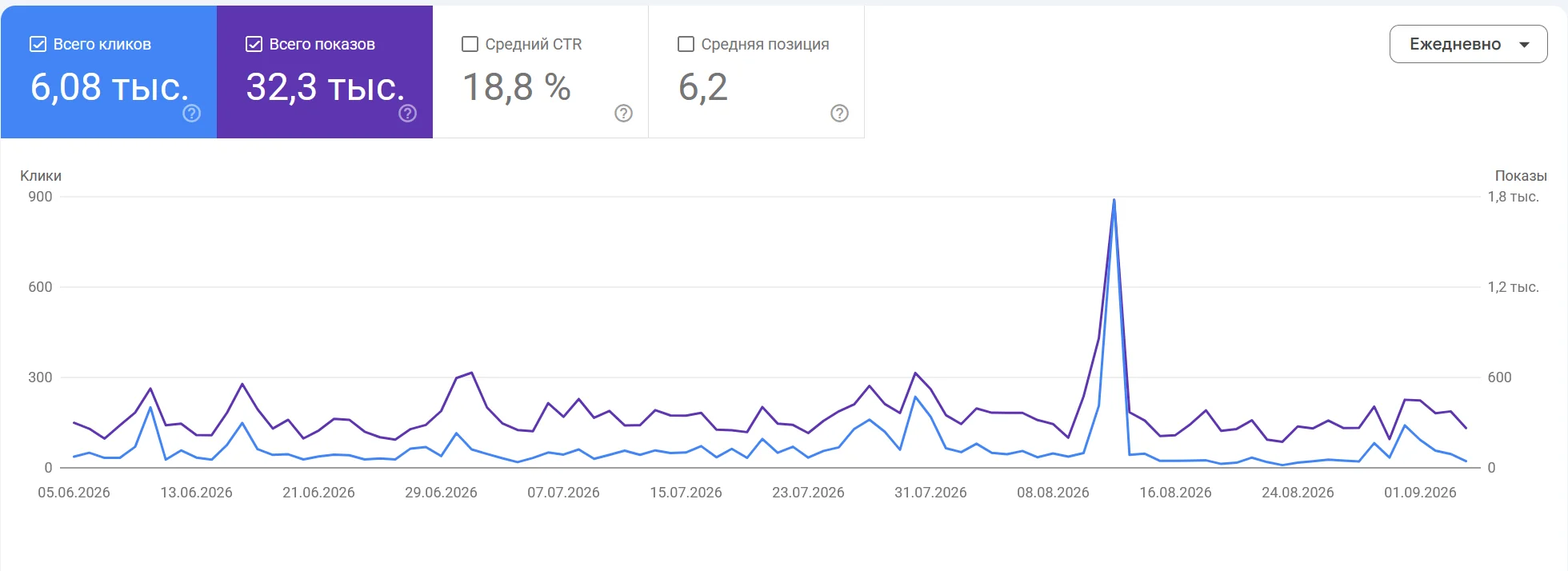
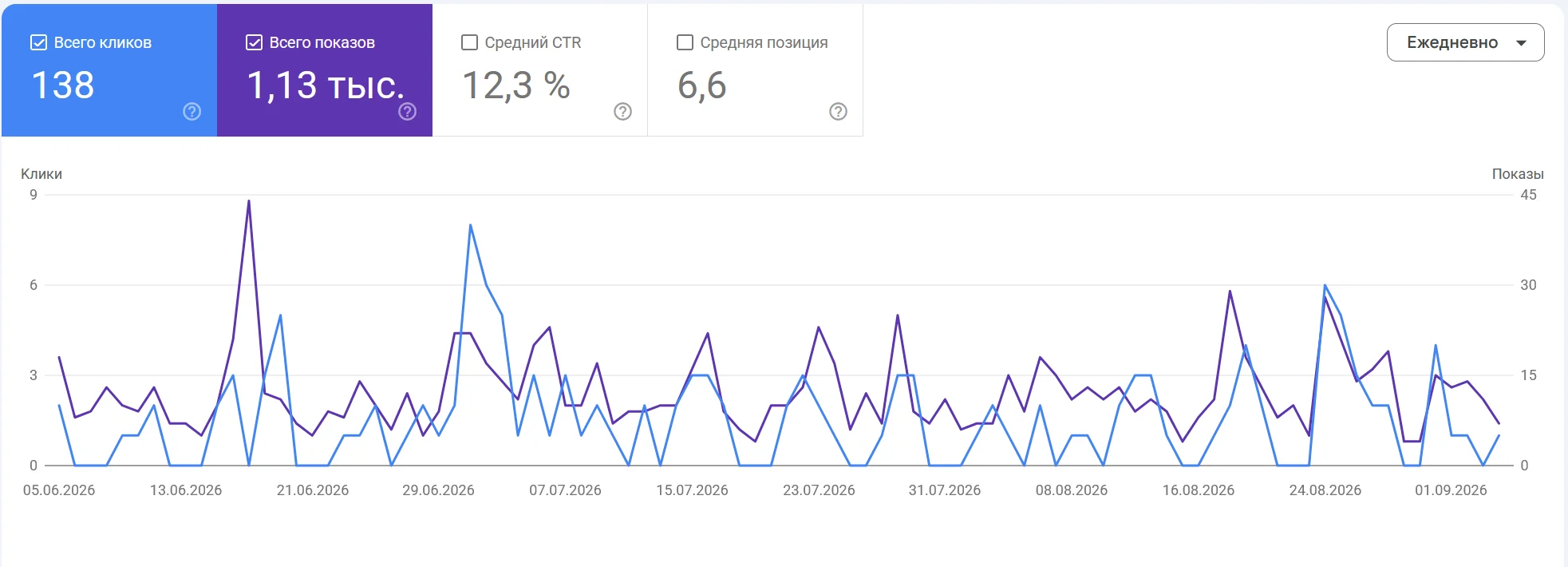
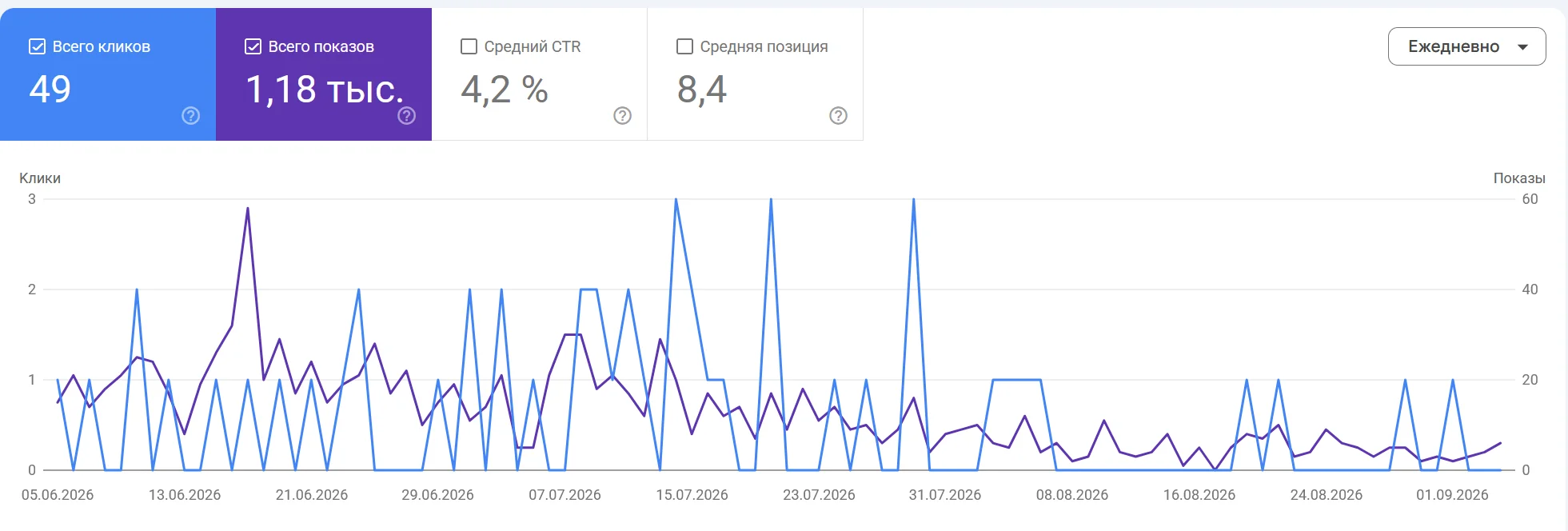
The practical takeaway: average position on its own says almost nothing about how many people will reach the site. The gap comes from which queries the site appears for, how the snippet looks, and how closely the title matches what the person was actually looking for. If someone shows you a report that contains positions and nothing else, you are seeing half the picture.
03The same impressions, a different number of clicks
The clearest pair here is shp.az and konteks.net. The impressions are almost equal, 1,130 against 1,180, meaning search showed them to people roughly the same number of times. The visits were 138 against 49.
The positions differ too, 6.6 against 8.4, and part of the gap comes from exactly that. But not all of it: one and a half rows of the results page do not produce a threefold difference in visits. The rest is the work of the page title and description, the very text a person reads before clicking. It is the cheapest place to apply effort in all of SEO: titles are rewritten in an evening, with no budget and no "promotion".
04Absolute clicks cannot be compared across sites
The alfanet.az report carries numbers of an entirely different order: 6,080 clicks and 32,300 impressions in three months. That is an excellent volume, and it comes first of all from what the company is: alfanet.az is an internet provider, and providers are searched for by name every single day, while a construction company or a furniture manufacturer has search demand of a different shape.
So comparing the absolute clicks of different sites is pointless: you would be comparing the size of two markets, not the quality of the work. What can be compared is what depends on the site itself: CTR, position and technical health.
05PageSpeed: 99 on desktop and 91 on a phone
We measure technical health in PageSpeed Insights. Our best result here is yakitori.az, an Asian food delivery site: 99 for performance on desktop, 100 out of 100 for SEO and for best practices, LCP of 0.9 seconds, a Speed Index of 0.8 seconds and zero layout shift.
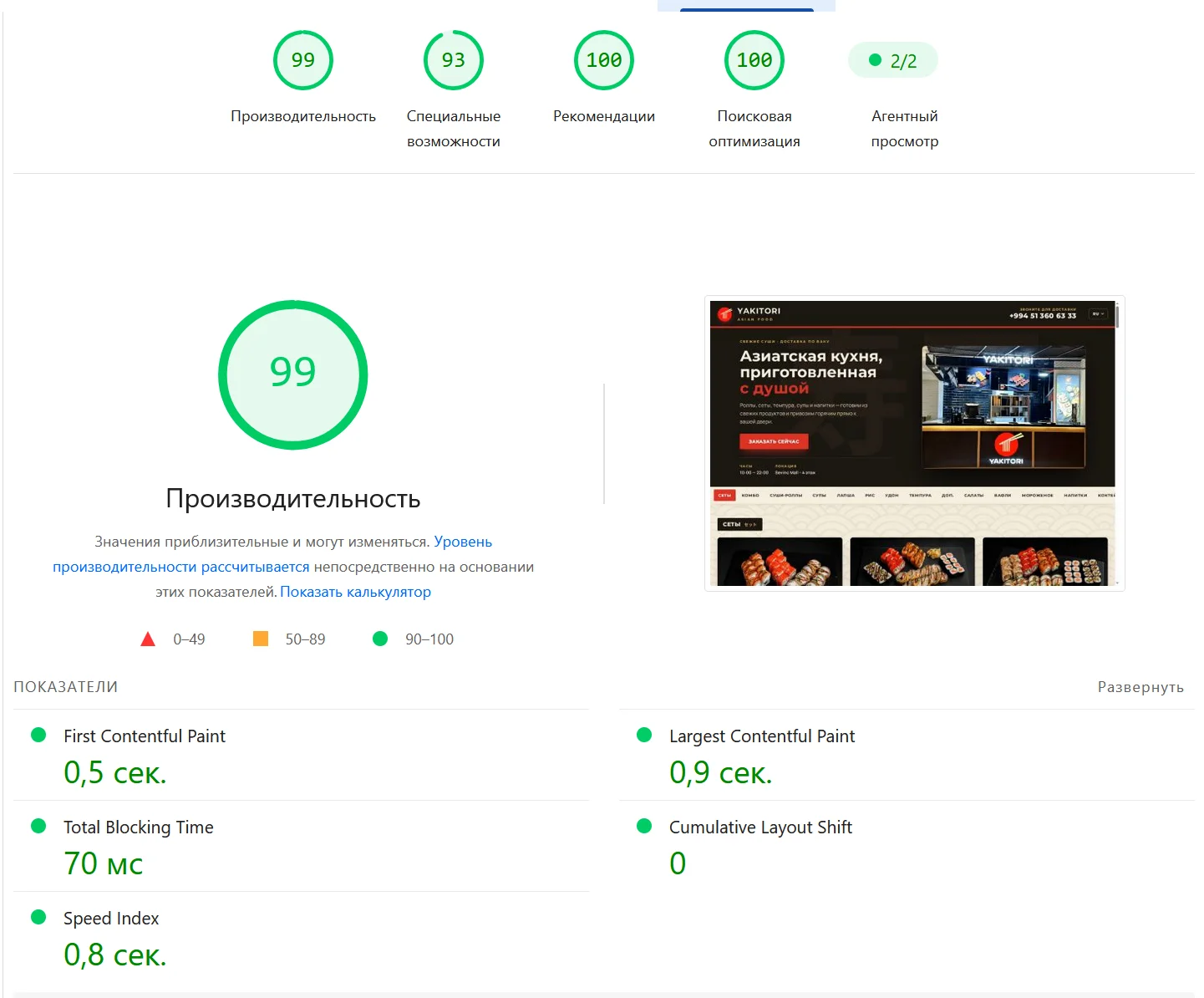
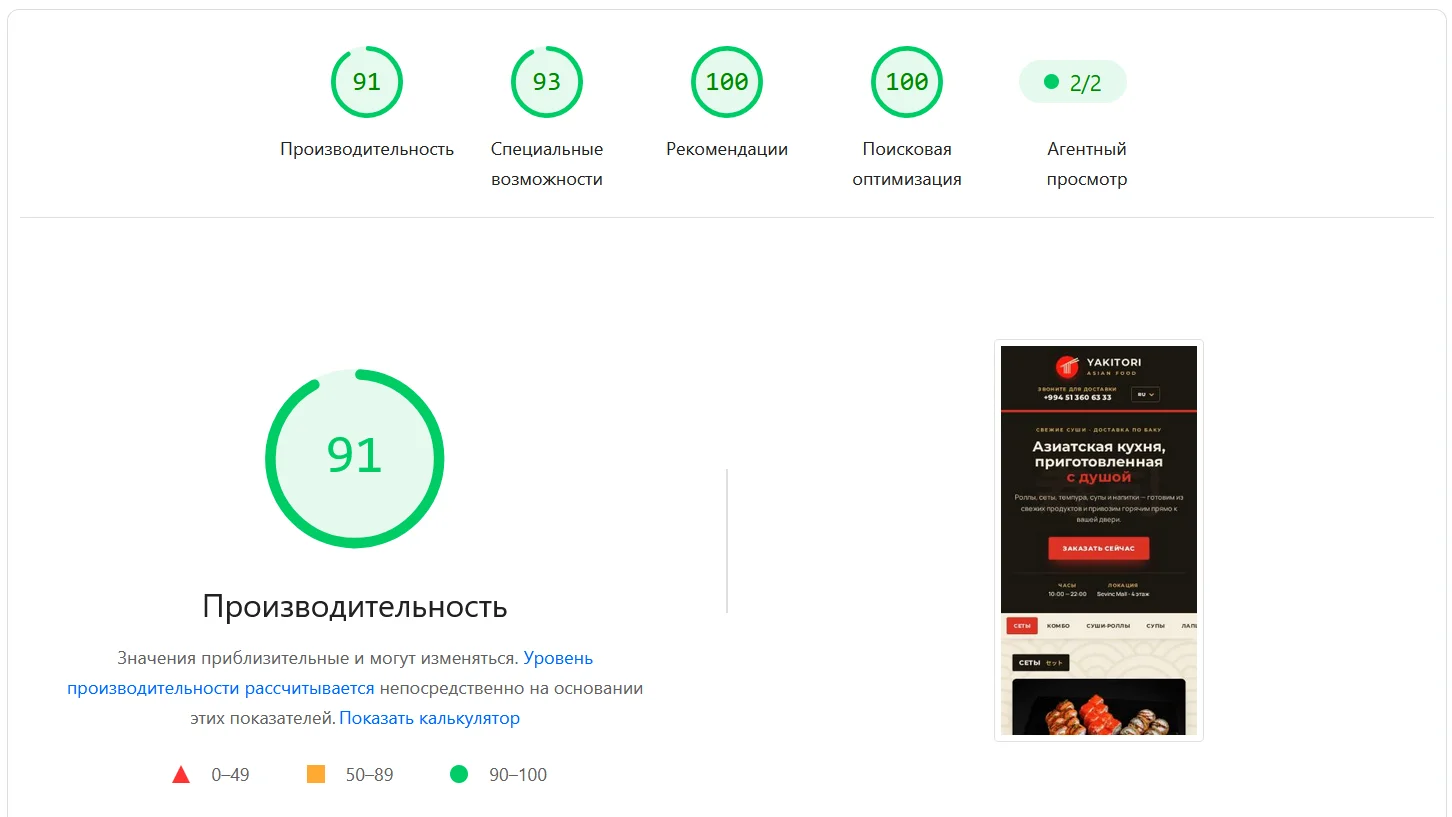
Note that these are two different numbers: 99 and 91. The mobile report is always stricter because it assumes a slow processor and a mobile network, and the gap between the two tabs can be far wider. On another site we built, desktop is also close to a hundred while the mobile LCP is 10.1 seconds: the entry page runs a preloader that pulls in around forty photographs, and until it finishes a phone user sees no hero screen at all. That was a deliberate decision by the site owner, but it does not cancel the number.
The conclusion is inconvenient and useful: a screenshot of a green hundred on desktop proves nothing if the traffic arrives from phones. Read the mobile report, and read LCP rather than the overall score.
06Some pages exist only for the owner
The least visible thing Search Console shows is the indexing report. In one of these accounts, 48 pages sit under "crawled - currently not indexed": the crawler saw them and did not take them into the index. Another five addresses return 404.
Such pages cannot be found in search at all, at any position. Keyword work does not cure this: until a page is in the index it does not take part in the results. That is why we open the indexing report before the queries report.
07How to review your own site in ten minutes
- Open the "Page indexing" report and compare the number of indexed pages with how many pages the site actually has. A gap of dozens of pages is the first thing to fix.
- In the "Performance" report switch on all four metrics at once: clicks, impressions, CTR and position. Position alone is not enough to draw conclusions from.
- Compare the last three months with the full available period. That shows direction, not just the current state.
- Sort queries by impressions and find the ones with many impressions and almost no clicks. Usually that is either the wrong topic or a poor page title.
- Run the site through PageSpeed Insights in mobile mode and look specifically at LCP.
- Export the data if the site is approaching 16 months: the old numbers disappear without warning.
08Why we are showing this
We build websites, and Search Console is not reporting paperwork for us but the instrument that shows whether the work holds up. The three accounts we have access to give exactly what is described above: visibility and indexing, while speed is measured separately in PageSpeed. Neither tool counts leads, and we are not going to pretend they do.
If you have access to your own Search Console and the numbers there make no sense, write to us. We will go through the reports and tell you what they show and what has to be measured with other tools.
More articles
- Web development Why write it yourself when Django can do it all for you? Why Django is the choice for a fast, secure launch: data protection, scalability, and saved resources.
- Mobile development React Native: how to build an app while your coffee is still hot One codebase for iOS and Android, fast time to market, and near-native performance - why Facebook, Instagram, and Airbnb choose it.
- Advertising Targeted advertising - from clicks to clients How precise audience targeting turns impressions into purchases: measurable campaigns and personalized offers.